How does JavaScript handle multiple things at once when it can only do one thing at a time? Why does this code print in a surprising order?
console.log('Start');
setTimeout(() => console.log('Timeout'), 0);
Promise.resolve().then(() => console.log('Promise'));
console.log('End');

// Output:
// Start
// End
// Promise
// Timeout
Even with a 0ms delay, Timeout prints last. The answer lies in the event loop. It's JavaScript's mechanism for handling asynchronous operations while remaining single-threaded.
What you'll learn in this guide:
- Why JavaScript needs an event loop (and what "single-threaded" really means)
- How setTimeout REALLY works (spoiler: the delay is NOT guaranteed!)
- The difference between tasks and microtasks (and why it matters)
- Why
Promise.then()runs beforesetTimeout(..., 0) - How to use setTimeout, setInterval, and requestAnimationFrame effectively
- Common interview questions explained step-by-step
Prerequisites: This guide assumes familiarity with the call stack and Promises. If those concepts are new to you, read them first!
What is the Event Loop?
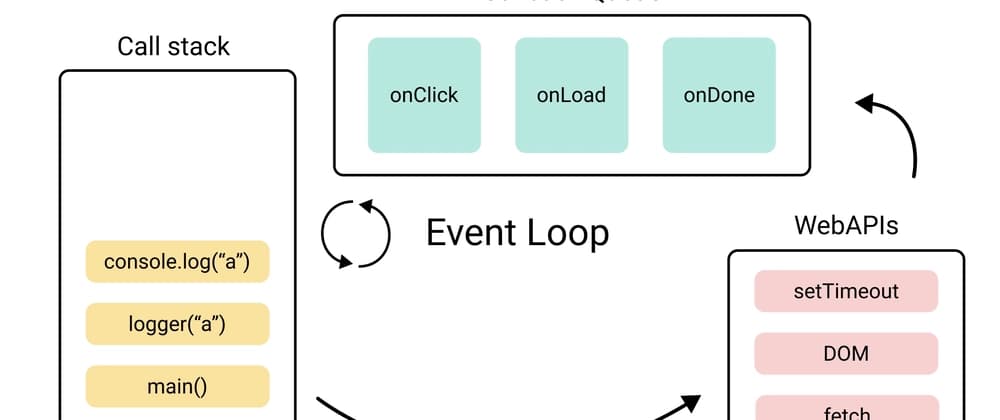
The event loop is JavaScript's mechanism for executing code, handling events, and managing asynchronous operations. As defined in the WHATWG HTML Living Standard, it coordinates execution by checking callback queues when the call stack is empty, then pushing queued tasks to the stack for execution. This enables non-blocking behavior despite JavaScript being single-threaded.
The Restaurant Analogy
Imagine a busy restaurant kitchen with a single chef who can only cook one dish at a time. Despite this limitation, the restaurant serves hundreds of customers because the kitchen has a clever system:
THE JAVASCRIPT KITCHEN

                                         ┌─────────────────────────┐
┌────────────────────────────────┐       │      KITCHEN TIMERS     │
│         ORDER SPIKE            │       │      (Web APIs)         │
│        (Call Stack)            │       │                         │
│  ┌──────────────────────────┐  │       │  [Timer: 3 min - soup]  │
│  │  Currently cooking:      │  │       │  [Timer: 10 min - roast]│
│  │  "grilled cheese"        │  │       │  [Waiting: delivery]    │
│  ├──────────────────────────┤  │       │                         │
│  │  Next: "prep salad"      │  │       └───────────┬─────────────┘
│  └──────────────────────────┘  │                   │
└────────────────────────────────┘                   │ (timer done!)
          ▲                                          ▼
          │                          ┌──────────────────────────────┐
          │                          │      "ORDER UP!" WINDOW      │
    KITCHEN MANAGER                  │        (Task Queue)          │
     (Event Loop)                    │                              │
                                     │  [soup ready] [delivery here]│
    "Chef free? ────────────────────►│                              │
     Here's the next order!"         └──────────────────────────────┘
          │                                          ▲
          │                          ┌───────────────┴──────────────┐
          │                          │       VIP RUSH ORDERS        │
          └──────────────────────────│      (Microtask Queue)       │
             (VIP orders first!)     │                              │
                                     │  [plating] [garnish]         │
                                     └──────────────────────────────┘
Here's how it maps to JavaScript:
| Kitchen | JavaScript |
|---|---|
| Single Chef | JavaScript engine (single-threaded) |
| Order Spike | Call Stack (current work, LIFO) |
| Kitchen Timers | Web APIs (setTimeout, fetch, etc.) |
| "Order Up!" Window | Task Queue (callbacks waiting) |
| VIP Rush Orders | Microtask Queue (promises, high priority) |
| Kitchen Manager | Event Loop (coordinator) |
The chef (JavaScript) can only work on one dish (task) at a time. But kitchen timers (Web APIs) run independently! When a timer goes off, the dish goes to the "Order Up!" window (Task Queue). The kitchen manager (Event Loop) constantly checks: "Is the chef free? Here's the next order!"
VIP orders (Promises) always get priority. They jump ahead of regular orders in the queue.
TL;DR: JavaScript is single-threaded but achieves concurrency by delegating work to browser APIs, which run in the background. When they're done, callbacks go into queues. The Event Loop moves callbacks from queues to the call stack when it's empty.
The Problem: JavaScript is Single-Threaded
JavaScript can only do one thing at a time. There's one call stack, one thread of execution.
// JavaScript executes these ONE AT A TIME, in order
console.log('First');   // 1. This runs
console.log('Second');  // 2. Then this
console.log('Third');   // 3. Then this
Why Is This a Problem?
Imagine if every operation blocked the entire program. Consider the Fetch API:
// If fetch() was synchronous (blocking)...
const data = fetch('https://api.example.com/data'); // Takes 2 seconds
console.log(data);
// NOTHING else can happen for 2 seconds!
// - No clicking buttons
// - No scrolling
// - No animations
// - Complete UI freeze!
A 30-second API call would freeze your entire webpage for 30 seconds. Users would think the browser crashed! According to Google's Core Web Vitals research, any interaction that takes longer than 200 milliseconds to respond is perceived as sluggish by users.
The Solution: Asynchronous JavaScript
JavaScript solves this by delegating long-running tasks to the browser (or Node.js), which handles them in the background. Functions like setTimeout() don't block:
console.log('Start');

// This doesn't block! Browser handles the timer
setTimeout(() => {
  console.log('Timer done');
}, 2000);

console.log('End');

// Output:
// Start
// End
// Timer done (after 2 seconds)
The secret sauce that makes this work? The Event Loop.
The JavaScript Runtime Environment
To understand the Event Loop, you need to see the full picture:
┌─────────────────────────────────────────────────────────────────────────┐
│                        JAVASCRIPT RUNTIME                               │
│  ┌─────────────────────────────────────────────────────────────────┐   │
│  │                      JAVASCRIPT ENGINE (V8, SpiderMonkey, etc.) │   │
│  │  ┌───────────────────────┐    ┌───────────────────────────┐     │   │
│  │  │      CALL STACK       │    │          HEAP             │     │   │
│  │  │                       │    │                           │     │   │
│  │  │  ┌─────────────────┐  │    │   { objects stored here } │     │   │
│  │  │  │ processData()   │  │    │   [ arrays stored here ]  │     │   │
│  │  │  ├─────────────────┤  │    │   function references     │     │   │
│  │  │  │ fetchUser()     │  │    │                           │     │   │
│  │  │  ├─────────────────┤  │    │                           │     │   │
│  │  │  │ main()          │  │    │                           │     │   │
│  │  │  └─────────────────┘  │    └───────────────────────────┘     │   │
│  │  └───────────────────────┘                                      │   │
│  └─────────────────────────────────────────────────────────────────┘   │
│                                                                         │
│  ┌─────────────────────────────────────────────────────────────────┐   │
│  │                    BROWSER / NODE.js APIs                        │   │
│  │                                                                  │   │
│  │   setTimeout()    setInterval()    fetch()    DOM events         │   │
│  │   requestAnimationFrame()    IndexedDB    WebSockets             │   │
│  │                                                                  │   │
│  │   (These are handled outside of JavaScript execution!)           │   │
│  └─────────────────────────────────────────────────────────────────┘   │
│                                    │                                    │
│                                    │ callbacks                          │
│                                    ▼                                    │
│  ┌──────────────────────────────────────────────────────────────────┐  │
│  │  MICROTASK QUEUE                    TASK QUEUE (Macrotask)       │  │
│  │  ┌────────────────────────┐        ┌─────────────────────────┐   │  │
│  │  │ Promise.then()         │        │ setTimeout callback     │   │  │
│  │  │ queueMicrotask()       │        │ setInterval callback    │   │  │
│  │  │ MutationObserver       │        │ I/O callbacks           │   │  │
│  │  │ async/await (after)    │        │ UI event handlers       │   │  │
│  │  └────────────────────────┘        │ Event handlers          │   │  │
│  │         ▲                          └─────────────────────────┘   │  │
│  │         │ HIGHER PRIORITY                    ▲                   │  │
│  └─────────┼────────────────────────────────────┼───────────────────┘  │
│            │                                    │                       │
│            └──────────┬─────────────────────────┘                       │
│                       │                                                 │
│              ┌────────┴────────┐                                        │
│              │   EVENT LOOP    │                                        │
│              │                 │                                        │
│              │  "Is the call   │                                        │
│              │   stack empty?" ├──────────► Push next callback          │
│              │                 │            to call stack               │
│              └─────────────────┘                                        │
└─────────────────────────────────────────────────────────────────────────┘
The Components
How the Event Loop Works: Step-by-Step
Let's trace through some examples to see the event loop in action.
Example 1: Basic setTimeout
console.log('Start');

setTimeout(() => {
  console.log('Timeout');
}, 0);

console.log('End');
Output: Start, End, Timeout
Why? Let's trace it step by step:
Execute console.log('Start')
Call stack: [console.log] → prints "Start" → stack empty
Call Stack: [console.log('Start')]
Web APIs: []
Task Queue: []
Output: "Start"
Execute setTimeout()
setTimeout is called → registers timer with Web APIs → immediately returns
Call Stack: []
Web APIs: [Timer: 0ms → callback]
Task Queue: []
The timer is handled by the browser, NOT JavaScript!
Timer completes (0ms)
Browser's timer finishes → callback moves to Task Queue
Call Stack: []
Web APIs: []
Task Queue: [callback]
Execute console.log('End')
But wait! We're still running the main script!
Call Stack: [console.log('End')]
Task Queue: [callback]
Output: "Start", "End"
Main script complete, Event Loop checks queues
Call stack is empty → Event Loop takes callback from Task Queue
Call Stack: [callback]
Task Queue: []
Output: "Start", "End", "Timeout"
Key insight: Even with a 0ms delay, setTimeout callback NEVER runs immediately. It must wait for:
- The current script to finish
- All microtasks to complete
- Its turn in the task queue
Example 2: Promises vs setTimeout
console.log('1');

setTimeout(() => console.log('2'), 0);

Promise.resolve().then(() => console.log('3'));

console.log('4');
Output: 1, 4, 3, 2
Why does 3 come before 2?
Synchronous code runs first
console.log('1') → prints "1"
setTimeout → registers callback in Web APIs → callback goes to Task Queue
Promise.resolve().then() → callback goes to Microtask Queue
console.log('4') → prints "4"
Output so far: "1", "4"
Microtask Queue: [Promise callback]
Task Queue: [setTimeout callback]
Microtasks run before tasks
Call stack empty → Event Loop checks Microtask Queue first
Promise callback runs → prints "3"
Output so far: "1", "4", "3"
Microtask Queue: []
Task Queue: [setTimeout callback]
Task Queue processed
Microtask queue empty → Event Loop takes from Task Queue
setTimeout callback runs → prints "2"
Final output: "1", "4", "3", "2"The Golden Rule: Microtasks (Promises) ALWAYS run before Macrotasks (setTimeout), regardless of which was scheduled first.
Example 3: Nested Microtasks
console.log('Start');

Promise.resolve()
  .then(() => {
    console.log('Promise 1');
    Promise.resolve().then(() => console.log('Promise 2'));
  });

setTimeout(() => console.log('Timeout'), 0);

console.log('End');
Output: Start, End, Promise 1, Promise 2, Timeout
Even though the second promise is created AFTER setTimeout was registered, it still runs first because the entire microtask queue must be drained before any task runs!
Tasks vs Microtasks: The Complete Picture
What Creates Tasks (Macrotasks)?
| Source | Description |
|---|---|
setTimeout(fn, delay) | Runs fn after at least delay ms |
setInterval(fn, delay) | Runs fn repeatedly every ~delay ms |
| I/O callbacks | Network responses, file reads |
| UI Events | click, scroll, keydown, mousemove |
setImmediate(fn) | Node.js only, runs after I/O |
MessageChannel | postMessage callbacks |
What about requestAnimationFrame? rAF is NOT a task. It runs during the rendering phase, after microtasks but before the browser paints. It's covered in detail in the Timers section.
What Creates Microtasks?
| Source | Description |
|---|---|
Promise.then/catch/finally | When promise settles |
async/await | Code after await |
queueMicrotask(fn) | Explicitly queue a microtask |
MutationObserver | When DOM changes |
The Event Loop Algorithm (Simplified)
// Pseudocode for the Event Loop (per HTML specification)
while (true) {
  // 1. Process ONE task from the task queue (if available)
  if (taskQueue.hasItems()) {
    const task = taskQueue.dequeue();
    execute(task);
  }

  // 2. Process ALL microtasks (until queue is empty)
  while (microtaskQueue.hasItems()) {
    const microtask = microtaskQueue.dequeue();
    execute(microtask);
    // New microtasks added during execution are also processed!
  }

  // 3. Render if needed (browser decides, typically ~60fps)
  if (shouldRender()) {
    // 3a. Run requestAnimationFrame callbacks
    runAnimationFrameCallbacks();
    // 3b. Perform style calculation, layout, and paint
    render();
  }

  // 4. Repeat (go back to step 1)
}
Microtask Starvation: If microtasks keep adding more microtasks, the task queue (and rendering!) will never get a chance to run:
// DON'T DO THIS - infinite microtask loop!
function forever() {
  Promise.resolve().then(forever);
}
forever(); // Browser freezes!
JavaScript Timers: setTimeout, setInterval, requestAnimationFrame
Now that you understand the event loop, let's dive deep into JavaScript's timing functions.
setTimeout: One-Time Delayed Execution
// Syntax
const timerId = setTimeout(callback, delay, ...args);

// Cancel before it runs
clearTimeout(timerId);
Basic usage:
// Run after 2 seconds
setTimeout(() => {
  console.log('Hello after 2 seconds!');
}, 2000);

// Pass arguments to the callback
setTimeout((name, greeting) => {
  console.log(`${greeting}, ${name}!`);
}, 1000, 'Alice', 'Hello');
// Output after 1s: "Hello, Alice!"
Canceling a timeout:
const timerId = setTimeout(() => {
  console.log('This will NOT run');
}, 5000);

// Cancel it before it fires
clearTimeout(timerId);
The "Zero Delay" Myth
setTimeout(fn, 0) does NOT run immediately!
console.log('A');
setTimeout(() => console.log('B'), 0);
console.log('C');

// Output: A, C, B (NOT A, B, C!)
Even with 0ms delay, the callback must wait for:
- Current script to complete
- All microtasks to drain
- Its turn in the task queue
The Minimum Delay (4ms Rule)
After 5 nested timeouts, browsers enforce a minimum 4ms delay:
let start = Date.now();
let times = [];

setTimeout(function run() {
  times.push(Date.now() - start);
  if (times.length < 10) {
    setTimeout(run, 0);
  } else {
    console.log(times);
  }
}, 0);

// Typical output (varies by browser/system): [1, 1, 1, 1, 4, 9, 14, 19, 24, 29]
// First 4-5 are fast, then 4ms minimum kicks in
setTimeout delay is a MINIMUM, not a guarantee!
const start = Date.now();

setTimeout(() => {
  console.log(`Actual delay: ${Date.now() - start}ms`);
}, 100);

// Heavy computation blocks the event loop
for (let i = 0; i < 1000000000; i++) {}

// Output might be: "Actual delay: 2547ms" (NOT 100ms!)
If the call stack is busy, the timeout callback must wait.
setInterval: Repeated Execution
// Syntax
const intervalId = setInterval(callback, delay, ...args);

// Stop the interval
clearInterval(intervalId);
Basic usage:
let count = 0;

const intervalId = setInterval(() => {
  count++;
  console.log(`Count: ${count}`);

  if (count >= 5) {
    clearInterval(intervalId);
    console.log('Done!');
  }
}, 1000);

// Output every second: Count: 1, Count: 2, ... Count: 5, Done!
The setInterval Drift Problem
setInterval doesn't account for callback execution time:
// Problem: If callback takes 300ms, and interval is 1000ms,
// actual time between START of callbacks is 1000ms,
// but time between END of one and START of next is only 700ms

setInterval(() => {
  // This takes 300ms to execute
  heavyComputation();
}, 1000);
Time: 0ms 1000ms 2000ms 3000ms
│ │ │ │
setInterval│───────│────────│────────│
│ 300ms │ 300ms │ 300ms │
│callback│callback│callback│
│ │ │ │
The 1000ms is between STARTS, not between END and STARTSolution: Nested setTimeout
For more precise timing, use nested setTimeout:
// Nested setTimeout guarantees delay BETWEEN executions
function preciseInterval(callback, delay) {
  function tick() {
    callback();
    setTimeout(tick, delay);  // Schedule next AFTER current completes
  }
  setTimeout(tick, delay);
}

// Now there's exactly `delay` ms between the END of one
// callback and the START of the next
Time: 0ms 1300ms 2600ms 3900ms
│ │ │ │
Nested │───────│────────│────────│
setTimeout│ 300ms│ 300ms │ 300ms │
│ + │ + │ + │
│ 1000ms│ 1000ms │ 1000ms │
│ delay │ delay │ delay │When to use which:
- setInterval: For simple UI updates that don't depend on previous execution
- Nested setTimeout: For sequential operations, API polling, or when timing precision matters
requestAnimationFrame: Smooth Animations
requestAnimationFrame (rAF) is designed specifically for animations. It syncs with the browser's refresh rate (usually 60fps = ~16.67ms per frame).
// Syntax
const rafId = requestAnimationFrame(callback);

// Cancel
cancelAnimationFrame(rafId);
Basic animation loop:
function animate(timestamp) {
  // timestamp = time since page load in ms

  // Update animation state
  element.style.left = (timestamp / 10) + 'px';

  // Request next frame
  requestAnimationFrame(animate);
}

// Start the animation
requestAnimationFrame(animate);
Why requestAnimationFrame is Better for Animations
| Feature | setTimeout/setInterval | requestAnimationFrame |
|---|---|---|
| Sync with display | No | Yes (matches refresh rate) |
| Battery efficient | No | Yes (pauses in background tabs) |
| Smooth animations | Can be janky | Optimized by browser |
| Timing accuracy | Can drift | Consistent frame timing |
| CPU usage | Runs even if tab hidden | Pauses when tab hidden |
Example: Animating with rAF
const box = document.getElementById('box');
let position = 0;
let lastTime = null;

function animate(currentTime) {
  // Handle first frame (no previous time yet)
  if (lastTime === null) {
    lastTime = currentTime;
    requestAnimationFrame(animate);
    return;
  }

  // Calculate time since last frame
  const deltaTime = currentTime - lastTime;
  lastTime = currentTime;

  // Move 100 pixels per second, regardless of frame rate
  const speed = 100; // pixels per second
  position += speed * (deltaTime / 1000);

  box.style.transform = `translateX(${position}px)`;

  // Stop at 500px
  if (position < 500) {
    requestAnimationFrame(animate);
  }
}

requestAnimationFrame(animate);
When requestAnimationFrame Runs
One Event Loop Iteration:
┌─────────────────────────────────────────────────────────────────┐
│ 1. Run task from Task Queue                                     │
├─────────────────────────────────────────────────────────────────┤
│ 2. Run ALL microtasks                                           │
├─────────────────────────────────────────────────────────────────┤
│ 3. If time to render:                                           │
│    a. Run requestAnimationFrame callbacks  ← HERE!              │
│    b. Render/paint the screen                                   │
├─────────────────────────────────────────────────────────────────┤
│ 4. If idle time remains before next frame:                      │
│    Run requestIdleCallback callbacks (non-essential work)       │
└─────────────────────────────────────────────────────────────────┘
Timer Comparison Summary
Use for: One-time delayed execution
// Delay a function call
setTimeout(() => {
  showNotification('Saved!');
}, 2000);

// Debouncing
let timeoutId;
input.addEventListener('input', () => {
  clearTimeout(timeoutId);
  timeoutId = setTimeout(search, 300);
});
Gotchas:
- Delay is minimum, not guaranteed
- 4ms minimum after 5 nested calls
- Blocked by long-running synchronous code
Classic Interview Questions
Question 1: Basic Output Order
console.log('1');
setTimeout(() => console.log('2'), 0);
Promise.resolve().then(() => console.log('3'));
console.log('4');Question 2: Nested Promises and Timeouts
setTimeout(() => console.log('timeout 1'), 0);

Promise.resolve().then(() => {
  console.log('promise 1');
  Promise.resolve().then(() => console.log('promise 2'));
});

setTimeout(() => console.log('timeout 2'), 0);

console.log('sync');Question 3: async/await Ordering
async function foo() {
  console.log('foo start');
  await Promise.resolve();
  console.log('foo end');
}

console.log('script start');
foo();
console.log('script end');Question 4: setTimeout in a Loop
for (var i = 0; i < 3; i++) {
  setTimeout(() => console.log(i), 0);
}Question 5: What's Wrong Here?
const start = Date.now();
setTimeout(() => {
  console.log(`Elapsed: ${Date.now() - start}ms`);
}, 1000);

// Simulate heavy computation
let sum = 0;
for (let i = 0; i < 1000000000; i++) {
  sum += i;
}
console.log('Heavy work done');Question 6: Microtask Starvation
function scheduleMicrotask() {
  Promise.resolve().then(() => {
    console.log('microtask');
    scheduleMicrotask();
  });
}

setTimeout(() => console.log('timeout'), 0);
scheduleMicrotask();Common Misconceptions
Blocking the Event Loop
What Happens When You Block?
When synchronous code runs for a long time, EVERYTHING stops:
// This freezes the entire page!
button.addEventListener('click', () => {
  // Heavy synchronous work
  for (let i = 0; i < 10000000000; i++) {
    // ... computation
  }
});
Consequences:
- UI freezes (can't click, scroll, or type)
- Animations stop
- setTimeout/setInterval callbacks delayed
- Promises can't resolve
- Page becomes unresponsive
Solutions
Move heavy computation to a separate thread using Web Workers:
// main.js
const worker = new Worker('worker.js');

worker.postMessage({ data: largeArray });

worker.onmessage = (event) => {
  console.log('Result:', event.data);
};

// worker.js
self.onmessage = (event) => {
  const result = heavyComputation(event.data);
  self.postMessage(result);
};
Rendering and the Event Loop
Where Does Rendering Fit?
The browser tries to render at 60fps (every ~16.67ms). Rendering happens between tasks, after microtasks:
┌─────────────────────────────────────────────────────┐
│                 One Frame (~16.67ms)                │
├─────────────────────────────────────────────────────┤
│  1. Task (from Task Queue)                          │
│  2. All Microtasks                                  │
│  3. requestAnimationFrame callbacks                 │
│  4. Style calculation                               │
│  5. Layout                                          │
│  6. Paint                                           │
│  7. Composite                                       │
└─────────────────────────────────────────────────────┘
Why 60fps Matters
| FPS | Frame Time | User Experience |
|---|---|---|
| 60 | 16.67ms | Smooth, responsive |
| 30 | 33.33ms | Noticeable lag |
| 15 | 66.67ms | Very choppy |
| < 10 | > 100ms | Unusable |
If your JavaScript takes longer than ~16ms, you'll miss frames and the UI will feel janky.
Using requestAnimationFrame for Visual Updates
Use rAF to avoid layout thrashing (reading and writing DOM in a way that forces multiple reflows):
// Bad: Read-write-read pattern forces multiple layouts
console.log(element.offsetWidth);     // Read (forces layout)
element.style.width = '100px';        // Write
console.log(element.offsetHeight);    // Read (forces layout AGAIN!)
element.style.height = '200px';       // Write

// Good: Batch reads together, then defer writes to rAF
const width = element.offsetWidth;    // Read
const height = element.offsetHeight;  // Read (same layout calculation)

requestAnimationFrame(() => {
  // Writes happen right before next paint
  element.style.width = width + 100 + 'px';
  element.style.height = height + 100 + 'px';
});
Common Bugs and Pitfalls
Interactive Visualization Tool
The best way to truly understand the Event Loop is to see it in action.
Loupe - Event Loop Visualizer
Created by Philip Roberts (author of the famous "What the heck is the event loop anyway?" talk). This tool lets you write JavaScript code and watch how it moves through the call stack, Web APIs, and callback queue in real-time.
Try this code in Loupe:
console.log('Start');

setTimeout(function timeout() {
  console.log('Timeout');
}, 2000);

Promise.resolve().then(function promise() {
  console.log('Promise');
});

console.log('End');
Watch how:
- Synchronous code runs first
- setTimeout goes to Web APIs
- Promise callback goes to microtask queue
- Microtasks run before the timeout callback
Key Takeaways
The key things to remember:
-
JavaScript is single-threaded — only one thing runs at a time on the call stack
-
The Event Loop enables async — it coordinates between the call stack and callback queues
-
Web APIs run in separate threads — timers, network requests, and events are handled by the browser
-
Microtasks > Tasks — Promise callbacks ALWAYS run before setTimeout callbacks
-
setTimeout delay is a minimum — actual timing depends on call stack and queue state
-
setInterval can drift — use nested setTimeout for precise timing
-
requestAnimationFrame for animations — syncs with browser refresh rate, pauses in background
-
Never block the main thread — long sync operations freeze the entire UI
-
Microtasks can starve tasks — infinite microtask loops prevent rendering
-
The Event Loop isn't JavaScript — it's part of the runtime environment (browser/Node.js)
Test Your Knowledge
Frequently Asked Questions
Related Concepts
Call Stack
Deep dive into how JavaScript tracks function execution
Promises
Understanding Promise-based asynchronous patterns
Content coming soon.async/await
Modern syntax for working with Promises
Content coming soon.JavaScript Engines
How V8 and other engines execute your code
Reference
JavaScript Execution Model — MDN
Official MDN documentation on the JavaScript runtime, event loop, and execution contexts.
setTimeout — MDN
Complete reference for setTimeout including syntax, parameters, and the minimum delay behavior.
setInterval — MDN
Documentation for repeated timed callbacks with usage patterns and gotchas.
requestAnimationFrame — MDN
Browser-optimized animation timing API that syncs with display refresh rate.
Articles
JavaScript Visualized: Event Loop
Lydia Hallie's famous visual explanation with animated GIFs showing exactly how the event loop works.
Tasks, microtasks, queues and schedules
Jake Archibald's definitive deep-dive with interactive examples. The go-to resource for understanding tasks vs microtasks.
The JavaScript Event Loop
Flavio Copes' clear explanation with excellent code examples showing Promise vs setTimeout behavior.
setTimeout and setInterval
Comprehensive JavaScript.info guide covering timers, cancellation, nested setTimeout, and the 4ms minimum delay.
Using requestAnimationFrame
Chris Coyier's practical guide to smooth animations with requestAnimationFrame, including polyfills and examples.
Why not to use setInterval
Deep dive into setInterval's problems with drift, async operations, and why nested setTimeout is often better.
Tools
Loupe - Event Loop Visualizer
Interactive tool by Philip Roberts to visualize how the call stack, Web APIs, and callback queue work together. Write code and watch it execute step by step.
Videos
What the heck is the event loop anyway?
Philip Roberts' legendary JSConf EU talk that made the event loop accessible to everyone. A must-watch for JavaScript developers.
In The Loop
Jake Archibald's JSConf.Asia talk diving deeper into tasks, microtasks, and rendering. The perfect follow-up to Philip Roberts' talk.
TRUST ISSUES with setTimeout()
Akshay Saini explains why you can't trust setTimeout's timing and how the event loop actually handles timers.